DSP Fundamentals
Distortion algorithms
The digital processing for achieving a distortion effect is mainly based on waveshaper functions, this is, applying a math expression to the input signal. The most common examples of this are clippers; there are many math expressions to describe a "soft" (smooth curve) or "hard" (rough curve) clipper.
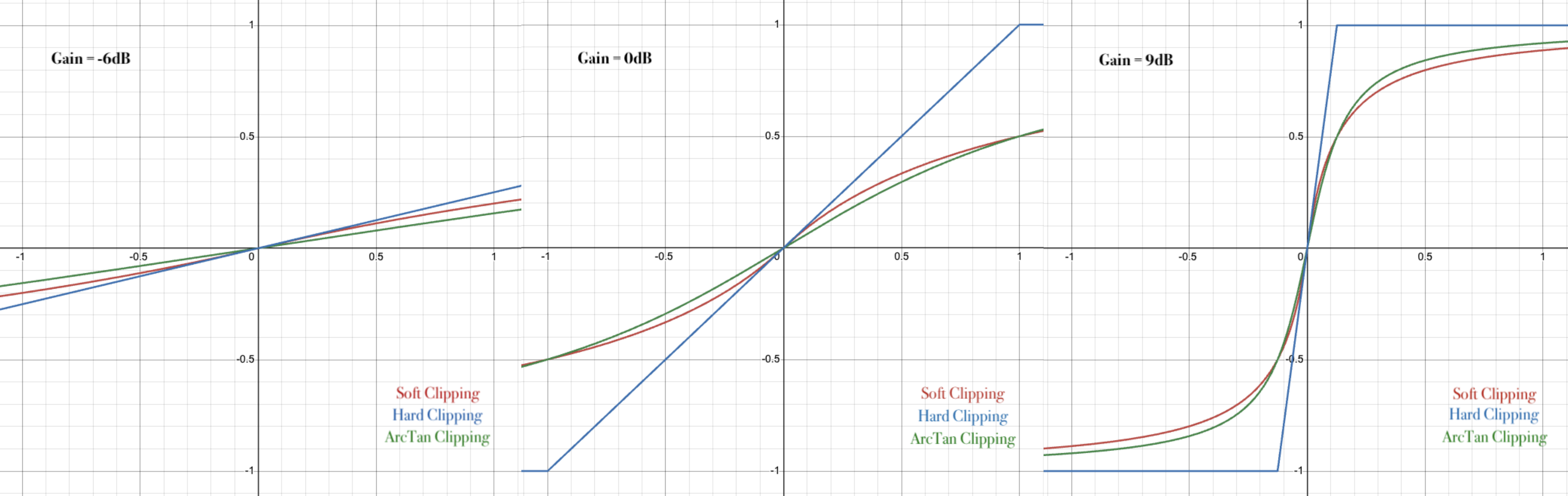
// Soft Clipping
float softClipping(float sample)
{
    return sample / (abs(sample) + 1.f);
}

// Hard Clipping
float hardClipping(float sample)
{
    if (sample > 1.f)
        return 1.f;
    else if (sample < -1.f)
        return -1.f;
    else
        return sample;
}

// aTan Clipping
float arcTanClipping(float sample)
{
    return 2.f / juce::MathConstants<float>::pi * std::atan(sample);
}
Implementation of a distortion with oversampling and bias in a JUCE plugin.
// Definition
class PluginProcessor : public juce::AudioProcessor
{
	private:
		using Gain = juce::dsp::Gain<float>;
	    using Shaper = juce::dsp::WaveShaper<float>;
	    using Bias = juce::dsp::Bias<float>;
	    using OverSampling = juce::dsp::Oversampling<float>;

		juce::dsp::ProcessorChain<Gain, Bias, Shaper> drive;

		OverSampling driveOS { 2, 2, OverSampling::filterHalfBandPolyphaseIIR, true, false };

		static float arcTanClipping(float sample);
}

// Initialization
void PluginProcessor::prepareToPlay (double sampleRate, int samplesPerBlock)
{
    juce::dsp::ProcessSpec spec;
    spec.maximumBlockSize = samplesPerBlock;
    spec.numChannels = getTotalNumOutputChannels();
    spec.sampleRate = sampleRate;

    drive.prepare(spec);
    drive.reset();
    drive.get<0>().setRampDurationSeconds(0.1);
    drive.get<2>().functionToUse = arcTanClipping;
}

// Values update
void PluginProcessor::updateDistortion()
{
    auto DRIVE = state.getRawParameterValue("DRIVE") -> load();
    auto BIAS = state.getRawParameterValue("BIAS") -> load();

    drive.get<0>().setGainDecibels(DRIVE);
    drive.get<1>().setBias(BIAS);
}

// Use
void PluginProcessor::processBlock AudioBuffer<float>& buffer, juce::MidiBuffer& midiMessages
{
	// Buffer cleaning
    juce::ignoreUnused (midiMessages);
    juce::ScopedNoDenormals noDenormals;
    auto totalNumInputChannels  = getTotalNumInputChannels();
    auto totalNumOutputChannels = getTotalNumOutputChannels();
    for (auto i = totalNumInputChannels; i < totalNumOutputChannels; ++i)
        buffer.clear (i, 0, buffer.getNumSamples());

	juce::dsp::AudioBlock<float> audioBlock (buffer);
    juce::dsp::ProcessContextReplacing<float> audioCtx(audioBlock);

	// Update parameter values
    updateState();

    // Distortion processing
    auto& inputBlock = audioCtx.getInputBlock();
    driveOS.processSamplesUp(inputBlock);
    drive.process(audioCtx);
    auto& outputBlock = audioCtx.getOutputBlock();
    driveOS.processSamplesDown(outputBlock);
}
Dynamics algorithms
Implementation of a compressor with input/output levels and a dry/wet blend control in a JUCE plugin.
// Definition
class PluginProcessor : public juce::AudioProcessor
{
	private:
		using Gain = juce::dsp::Gain<float>;
		using Compressor = juce::dsp::Compressor<float>;
		using Mix = juce::dsp::DryWetMixer<float>;

		Compressor comp;
		Gain inputLevel, outputLevel;
		Mix dryWetMix;
}

// Initialization
void PluginProcessor::prepareToPlay (double sampleRate, int samplesPerBlock)
{
    juce::dsp::ProcessSpec spec;
    spec.maximumBlockSize = samplesPerBlock;
    spec.numChannels = getTotalNumOutputChannels();
    spec.sampleRate = sampleRate;

    inputLevel.prepare(spec);
    inputLevel.setRampDurationSeconds(0.1);

    dryWetMix.prepare(spec);

    comp.prepare(spec);
    comp.setRatio(DEFAULT_RATIO);
    comp.setThreshold(DEFAULT_THRES);
    comp.setAttack(DEFAULT_ATT);
    comp.setRelease(DEFAULT_REL);

    outputLevel.prepare(spec);
    outputLevel.setRampDurationSeconds(0.1);
}

// Values update
void PluginProcessor::updateComp()
{
    auto RAT = state.getRawParameterValue("COMP_RATIO") -> load();
    auto THR = state.getRawParameterValue("COMP_THRES") -> load();
    auto ATT = state.getRawParameterValue("COMP_ATT") -> load();
    auto REL = state.getRawParameterValue("COMP_REL") -> load();

	comp.setRatio(RAT);
	comp.setThreshold(THR);
	comp.setAttack(ATT);
	comp.setRelease(REL);
}

// Use
void PluginProcessor::processBlock AudioBuffer<float>& buffer, juce::MidiBuffer& midiMessages
{
	// Buffer cleaning
    juce::ignoreUnused (midiMessages);
    juce::ScopedNoDenormals noDenormals;
    auto totalNumInputChannels  = getTotalNumInputChannels();
    auto totalNumOutputChannels = getTotalNumOutputChannels();
    for (auto i = totalNumInputChannels; i < totalNumOutputChannels; ++i)
        buffer.clear (i, 0, buffer.getNumSamples());

	juce::dsp::AudioBlock<float> audioBlock (buffer);
    juce::dsp::ProcessContextReplacing<float> audioCtx(audioBlock);

	// Update parameter values
    updateState();

    // Input processing
    inputLevel.process(audioCtx);
    dryWetMix.pushDrySamples(audioBlock);

	// Compressor processing
    comp.process(audioCtx);

    // Output processing
    dryWetMix.mixWetSamples(audioBlock);
    outputLevel.process(audioCtx);
}
Filter algorithms
Implementation of an equalizer in a JUCE plugin.
// Definition
class PluginProcessor : public juce::AudioProcessor
{
	private:
		using FilterBand = juce::dsp::ProcessorDuplicator<juce::dsp::IIR::Filter<float>, juce::dsp::IIR::Coefficients<float>>;

		juce::dsp::ProcessorChain<FilterBand, FilterBand, FilterBand, FilterBand, FilterBand> equalizer;
}

// Initialization
void PluginProcessor::prepareToPlay (double sampleRate, int samplesPerBlock)
{
    juce::dsp::ProcessSpec spec;
    spec.maximumBlockSize = samplesPerBlock;
    spec.numChannels = getTotalNumOutputChannels();
    spec.sampleRate = sampleRate;

    equalizer.prepare(spec);
    equalizer.reset();
}

// Values update
void PluginProcessor::updatePreEQ()
{
    auto HPF = state.getRawParameterValue("PRE_HPF") -> load();
    auto LPF = state.getRawParameterValue("PRE_LPF") -> load();
    auto LO_GAIN = state.getRawParameterValue("PRE_LOW_GAIN") -> load();
    auto LO_FREQ = state.getRawParameterValue("PRE_LOW_FREQ") -> load();
    auto LO_Q = state.getRawParameterValue("PRE_LOW_Q") -> load();
    auto MID_GAIN = state.getRawParameterValue("PRE_MID_GAIN") -> load();
    auto MID_FREQ = state.getRawParameterValue("PRE_MID_FREQ") -> load();
    auto MID_Q = state.getRawParameterValue("PRE_MID_Q") -> load();
    auto HIGH_GAIN = state.getRawParameterValue("PRE_HIGH_GAIN") -> load();
    auto HIGH_FREQ = state.getRawParameterValue("PRE_HIGH_FREQ") -> load();
    auto HIGH_Q = state.getRawParameterValue("PRE_HIGH_Q") -> load();

    LO_GAIN = juce::Decibels::decibelsToGain(LO_GAIN);
    MID_GAIN = juce::Decibels::decibelsToGain(MID_GAIN);
    HIGH_GAIN = juce::Decibels::decibelsToGain(HIGH_GAIN);

	double sampleRate = getSampleRate();

	*equalizer.get<0>().state = *juce::dsp::IIR::Coefficients<float>::makeHighPass(sampleRate, HPF);
	*equalizer.get<1>().state = *juce::dsp::IIR::Coefficients<float>::makeLowPass(sampleRate, LPF);
	*equalizer.get<2>().state = *juce::dsp::IIR::Coefficients<float>::makePeakFilter(sampleRate, LO_FREQ, LO_Q, LO_GAIN);
	*equalizer.get<3>().state = *juce::dsp::IIR::Coefficients<float>::makePeakFilter(sampleRate, MID_FREQ, MID_Q, MID_GAIN);
	*equalizer.get<4>().state = *juce::dsp::IIR::Coefficients<float>::makePeakFilter(sampleRate, HIGH_FREQ, HIGH_Q, HIGH_GAIN);
}

// Use
void PluginProcessor::processBlock AudioBuffer<float>& buffer, juce::MidiBuffer& midiMessages
{
	// Buffer cleaning
    juce::ignoreUnused (midiMessages);
    juce::ScopedNoDenormals noDenormals;
    auto totalNumInputChannels  = getTotalNumInputChannels();
    auto totalNumOutputChannels = getTotalNumOutputChannels();
    for (auto i = totalNumInputChannels; i < totalNumOutputChannels; ++i)
        buffer.clear (i, 0, buffer.getNumSamples());

	juce::dsp::AudioBlock<float> audioBlock (buffer);
    juce::dsp::ProcessContextReplacing<float> audioCtx(audioBlock);

	// Update parameter values
    updateState();

	// Equalizer processing
    equalizer.process(audioCtx);
}
Analog gear emulation
Lately, it's very common to look for digital emulations of analog equipment. For that kind of emulation, there are two ways to proceed:
-
Wave Digital Filters: This method aims to model the behaviour of analog gear by discretizing its circuits, it's a white-box approach. AFAIK, it's the best approach for an accurate and non-CPU-demanding emulation; however, it's necessary to understand the schematics of the gear and the code implementation is quite complex. If I have the chance to deepen my knowledge on this method, I'll surely write about it in a different section.
-
Combine waveshapers and filters: This method aims to emulate the behavior of any gear by means of digital filters and waveshapers. It's a black-box approach, we don't need to know the insights of the equipment as long as we make it sound similar in the end. While it is very tedious for achieving an exact match with analog gear, I believe it's a good method for emulating simple effects or even prototyping new ideas.
-
Recurrent Neural Networks (RNN): This is another black-box approach where we train a Machine Learning model with the clean input and processed output of certain equipment; the model should learn to process any given input signal as the analog gear would. This is the method I used for most of the plugins in PunkFX and while it works great, I suggest following previous approaches because of the high CPU usage of Neural Networks.